


70mai
3.2346.00 Reviews
App Specs
- Version
- 4.2.0
- Updated On
- License
- Free
- Downloads
- 100,000+
- Developer
- 70mai Co.,Ltd
- Categories
- Auto & Vehicles
- Platform
- Android
Screenshots
 Analysis by AppCompare
When I want to check a dash-cam clip, I’d rather do it from my phone than pull out a memory card and find a computer. That practical convenience is the main reason to consider 70mai: it acts as a mobile companion for compatible 70mai dash cams, bringing live viewing and footage management into one place. It is a free Auto & Vehicles app from 70mai Co.,Ltd, and its usefulness depends on having the right camera; on its own, it is not a general-purpose driving or navigation app.
The idea sounds simple, but it changes how you handle the moments after a drive. You can check the camera’s view, look for a particular recording, and move a clip onto your phone without treating the dash cam as a separate gadget. I see that as the app’s central strength: it makes the camera easier to use when you need its footage, rather than trying to replace the camera itself.
Getting Started with 70mai
First things first, downloading and setting up the app was a breeze. Available on both Android and iOS, just head over to your app store, type in "70mai," and you’re good to go. The installation took me just a few minutes, and I was ready to pair it with my dash cam.
The pairing process was surprisingly simple. I turned on my dash cam, opened the app, and followed the on-screen instructions. A few taps here and there, and voila, my phone and dash cam were talking to each other like old friends. It’s intuitive and easy—even if you’re not the most tech-savvy person out there.
Features That Stand Out
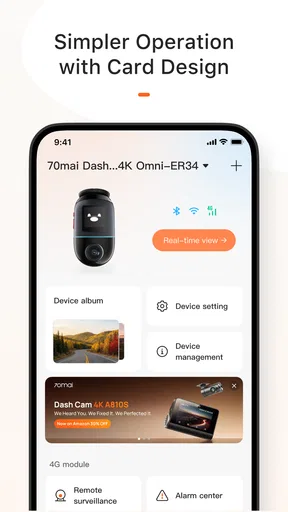
So, what does 70mai offer once you're all set up? A ton of features that are both practical and downright cool. The app interface is clean and user-friendly, which I really appreciated.
- Real-Time Footage
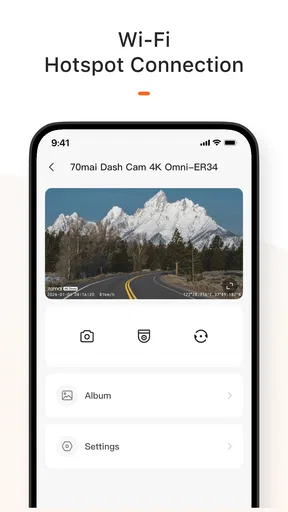
- One of the standout features for me was the ability to view real-time footage directly from the dash cam. Whether you want to keep an eye on the road or capture a scenic drive, this feature is a game-changer.
- Video Management
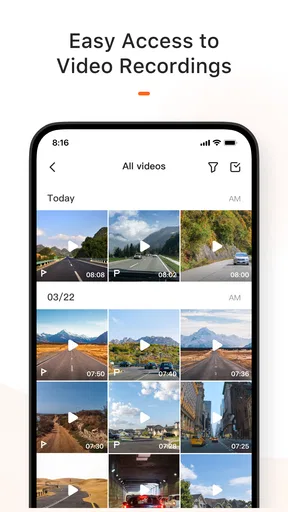
- Managing your videos is a piece of cake. The app allows you to download, save, and share clips with ease. I found the download speeds quite decent, and sharing a funny road moment with friends was just a tap away.
- Firmware Updates
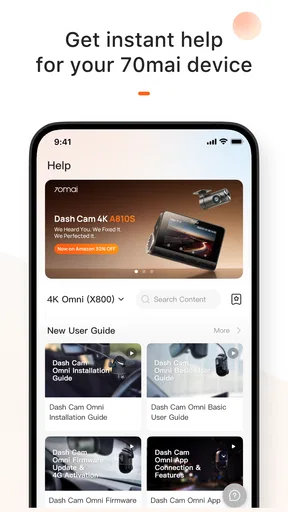
- Keeping your dash cam up-to-date is crucial, and the app makes this seamless. Notifications about firmware updates pop up, and you can update everything directly through the app. No need to mess around with SD cards or cables.
For me, real-time viewing is most useful as a quick check, not something to watch while driving. If I’m parked and need to confirm that the camera is aimed where I expect, seeing its view on my phone can save guesswork. I’d make those adjustments before setting off, then leave the screen alone on the road. A dash cam should quietly record while I concentrate on driving; the phone is for setup and review, not a second dashboard to monitor.
That distinction also helps set expectations. A live view is not the same as having a polished video editor or a cloud archive. The app’s practical job is to connect you with the camera and its recordings. If your main need is to trim, annotate, or organize large collections of driving footage, a dedicated desktop tool may be a better fit after you retrieve the clips. I’d use this app to find and transfer the relevant moment, then move to another tool only if the clip needs more involved editing.
Worth Reading Before You Choose

EA SPORTS FC Mobile 26 Is a Bigger Football Game, but It Takes Time

Flipboard Shows What News Apps Must Do Beyond the Feed

Switching to Android Auto Means Rethinking Your Driving Routine

Google Calendar Makes a Crowded Week Easier to Manage

Ludo King Makes the Most of the Minutes Between Plans

Baby Panda World Brings Quick Play to Modern Phones, but Its Game Library Feels Busy
Making Footage Useful After a Drive
Video management matters most when a clip has a purpose. If something unexpected happens, I would first get to a safe stopping place, then use the app to locate and save the relevant footage. Saving a useful clip to the phone can make it easier to share with someone who needs to see it, while leaving the rest of the recordings on the camera avoids filling the phone with routine journeys. This small habit is more useful than downloading everything automatically.
A sensible workflow is to check the camera after parking, identify the recording while the trip is still fresh in your mind, and save only what you may need. If the footage concerns a minor scrape or an unclear road incident, I would keep the original recording intact on the camera as well as making a phone copy, rather than treating a shared copy as the only record. The app can simplify access, but it cannot decide which evidence matters or replace careful handling of an important clip.
There is a trade-off in wireless convenience: a phone connection is handy for checking and transferring, but it is not necessarily the quickest route for moving a large amount of video. For one short clip, the direct app workflow is appealing. If I wanted to archive many trips, I would compare that process with handling the camera’s storage directly, where appropriate, instead of assuming a phone transfer is always the most efficient option.
Performance on the Road
Using the app on the road was smooth. The connection between the app and the dash cam was stable throughout my drives. I took it through urban jungles and open highways, and it didn’t miss a beat.
The video quality streamed on my phone was crystal clear. I was able to capture everything from license plates to stunning sunsets. There was a slight lag in the live feed, but nothing that would really affect usage. And hey, considering it's all happening wirelessly, it's pretty impressive.
That slight delay is worth keeping in mind if you are judging the live image precisely. For framing or checking that the scene appears on screen, a little lag is unlikely to matter much; for anything that demands instant feedback, I would not treat the phone preview as a real-time driving aid. I’d also check that a clip has finished transferring before relying on the phone copy, especially when I need to leave the car soon after reviewing it.
In ordinary use, the best scenario is a parked-car check after a commute. Imagine hearing a sharp bump in traffic and being unsure whether it was your vehicle or the car beside you. Once safely stopped, you can review the camera’s recording, find the relevant section, and save it for a closer look. That is more useful than scrolling through footage at home hours later, when you may no longer remember the exact moment. It is still the driver’s responsibility to stop safely before handling the phone.
The app also has a different role from the usual alternatives people use with a dash cam. A camera’s physical buttons can be enough for basic recording, while removing storage and using a computer may suit someone who archives long journeys or prefers a larger screen. The 70mai app is the middle ground: more convenient for a quick view or selected transfer, less suited to intensive file work. Compared with a generic gallery app, it connects directly to the camera workflow; compared with a full video editor, it is meant to get footage onto the phone, not give you a complete production suite.
Compatibility is the first practical question I would settle before relying on it. Since the app is designed as a companion for 70mai dash cams, it makes the most sense if you own a compatible model; it is not a reason by itself to choose a camera without checking that the particular device works with it. Once paired, I would also test the connection and a short clip transfer while parked. That gives you a feel for the process before an urgent moment, when you do not want to learn the controls under pressure.
Another useful habit is to check for a firmware update when you have time and a stable setup, rather than beginning an update just before a drive. Firmware maintenance is convenient through the app, but updates are still a device-maintenance task; I would let the process finish without interruption and confirm the camera is ready before setting off. That is a small precaution, but it prevents a routine update from becoming an avoidable distraction.
Who Will Get the Most from It
The app is best for drivers who already use a 70mai camera and want convenient access to live view, clips, and firmware maintenance. It particularly suits someone who checks footage occasionally rather than building a large archive. A new driver, a commuter, or a person who wants to review a specific parking or traffic incident may appreciate having the camera connection close at hand. The free price makes it easy to try, though the practical value still comes from the compatible hardware.
I would skip it if you do not own a compatible 70mai dash cam, or if your priority is a universal dash-cam manager that works across brands. It is also not the best choice for someone who expects comprehensive editing, automatic long-term backup, or a replacement for a dedicated navigation app. Those are different needs. For a mixed collection of camera brands, a computer-based workflow or each device maker’s own tools may be less frustrating than expecting one app to manage everything.
The public response gives a reason to keep expectations measured: it has a 3.1 average from 882 ratings, alongside 342 written reviews. That does not tell me how every phone-camera pairing will behave, but it is a reminder that a clean setup is not the whole story for every user. I would judge it by the basic tasks that matter to me—connecting to my camera, viewing a clip, and saving it successfully—rather than assuming that every feature will feel equally polished on every setup.
It has been available since February 7, 2018, and its current version is 4.0.1. It is rated for Everyone and supports Android 7.0 and later. Those details help establish whether it fits an older Android device, but I would still check that the phone has enough room for clips I choose to keep and that the camera is ready to connect before a trip. The app has passed 100K+ installs, but popularity alone does not remove the need to verify compatibility with your own dash cam.
Wrapping It Up
Overall, the 70mai app is a solid companion for anyone with a 70mai dash cam. It enhances the functionality of the cam, making it easier to manage footage and keep the device updated. It's user-friendly, packed with features, and doesn’t overwhelm you with unnecessary complexity.
If you're in the market for a dash cam or already own one from 70mai, the app is definitely worth having. It adds value, and makes your driving experience a bit more tech-savvy without being intrusive. So, go ahead, give it a try, and hit the road with confidence!
My recommendation is strongest when you think of it as a practical bridge between the camera and your phone, not as a reason to handle a screen while driving. If you already have compatible hardware, it can make checking and keeping a useful recording feel less like a chore. If you are choosing a camera from scratch, decide first what you need from the camera itself, then treat this app as a helpful part of that setup rather than the whole decision.
Pros
- User-friendly interface and easy navigation.
- High-quality video recording capabilities.
- Affordable pricing for the features offered.
- Compact design fits discreetly in any vehicle.
- Wide-angle lens captures more of the road.
Cons
- Limited storage capacity without additional SD card.
- No built-in GPS for location tracking.
- App connectivity can be occasionally unstable.
- Limited battery life; needs constant power.
- Voice control features can be unresponsive.
FAQs for 70mai
What is 70mai and what features does it offer?
70mai is a smart dash cam app that provides drivers with enhanced safety features. It offers high-resolution video recording, real-time alerts, and AI-powered incident detection. Users can access video playback, parking surveillance, and voice control. The app also integrates seamlessly with the 70mai hardware for optimal performance.
Is 70mai compatible with all smartphones and vehicles?
70mai is designed to be compatible with most Android and iOS smartphones. However, compatibility with specific vehicle models may depend on the dash cam hardware you choose. It’s advisable to check the compatibility list on the 70mai website or consult their customer support for specific model queries.
How does 70mai enhance driving safety?
70mai enhances driving safety with features like lane departure warnings, forward collision alerts, and real-time monitoring. The app's AI technology helps in detecting potential hazards and notifies the driver, potentially preventing accidents. Additionally, the parking surveillance feature monitors your vehicle while unattended, offering extra security.
Does 70mai require a subscription or additional fees?
70mai primarily operates without a subscription, providing most of its features upon purchasing the hardware. However, certain cloud services or advanced functionalities may require a subscription or one-time fees. It’s best to review the app’s pricing details and confirm any additional costs before downloading.
How easy is it to set up and use 70mai?
Setting up 70mai is straightforward, thanks to its user-friendly interface and detailed installation guide. The app walks you through the setup process, connecting your dash cam to the smartphone. Additionally, its intuitive design ensures that accessing features like video playback and alerts is simple, even for first-time users.


